[TOC]
部署时钟服务器
服务器信息
| 序号 | 类型 | ip | 软件 | 备注 |
|---|---|---|---|---|
| 1 | server | 192.168.1.234 | ntp | · |
| 2 | client | 192.168.1.236 | chrony | · |
server
1.1 清理
- 清理自带包
yum remove ntpdate -y1.2 安装ntp服务端
- yum安装
yum install ntp -y- 启动及设置开机自启
systemctl start ntpd && systemctl enable ntpd1.3 修改配置
[root@ntp ~]# grep -E '^[A-Za-z0-9]' /etc/ntp.conf
driftfile /var/lib/ntp/drift
restrict default nomodify
restrict 127.0.0.1
restrict ::1
restrict 192.168.1.0 mask 255.255.255.0 nomodify notrap
server 192.168.1.234 iburst
server 127.127.1.0
fudge 127.127.1.0 stratum 10
includefile /etc/ntp/crypto/pw
keys /etc/ntp/keys
logfile /tmp/ntp.log
disable monitor
1.4 重启ntp服务器
[root@ntp ~]# systemctl restart ntpd2.client
2.1 安装chrony
$ yum install chrony -y2.2 修改配置
$ vim /etc/chrony.conf
# 注释掉自带的时钟源,新增以下
server 192.168.1.234 iburst
2.3 重启chrony服务
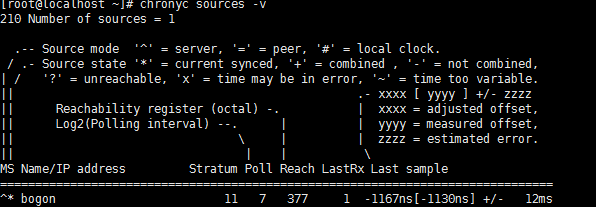
$ systemctl restart chronyd2.4 查看同步情况
$ chronyc sources -v